> ## Documentation Index
> Fetch the complete documentation index at: https://allhandsai-vertex-agent-server-docs.mintlify.site/llms.txt
> Use this file to discover all available pages before exploring further.

# Plugin Marketplace

> Enable and configure the Plugin Marketplace to browse and install community-built OpenHands plugins.

<div style={{display: 'flex', gap: '1.5rem', alignItems: 'flex-start'}}>
  <div style={{flex: 1}}>
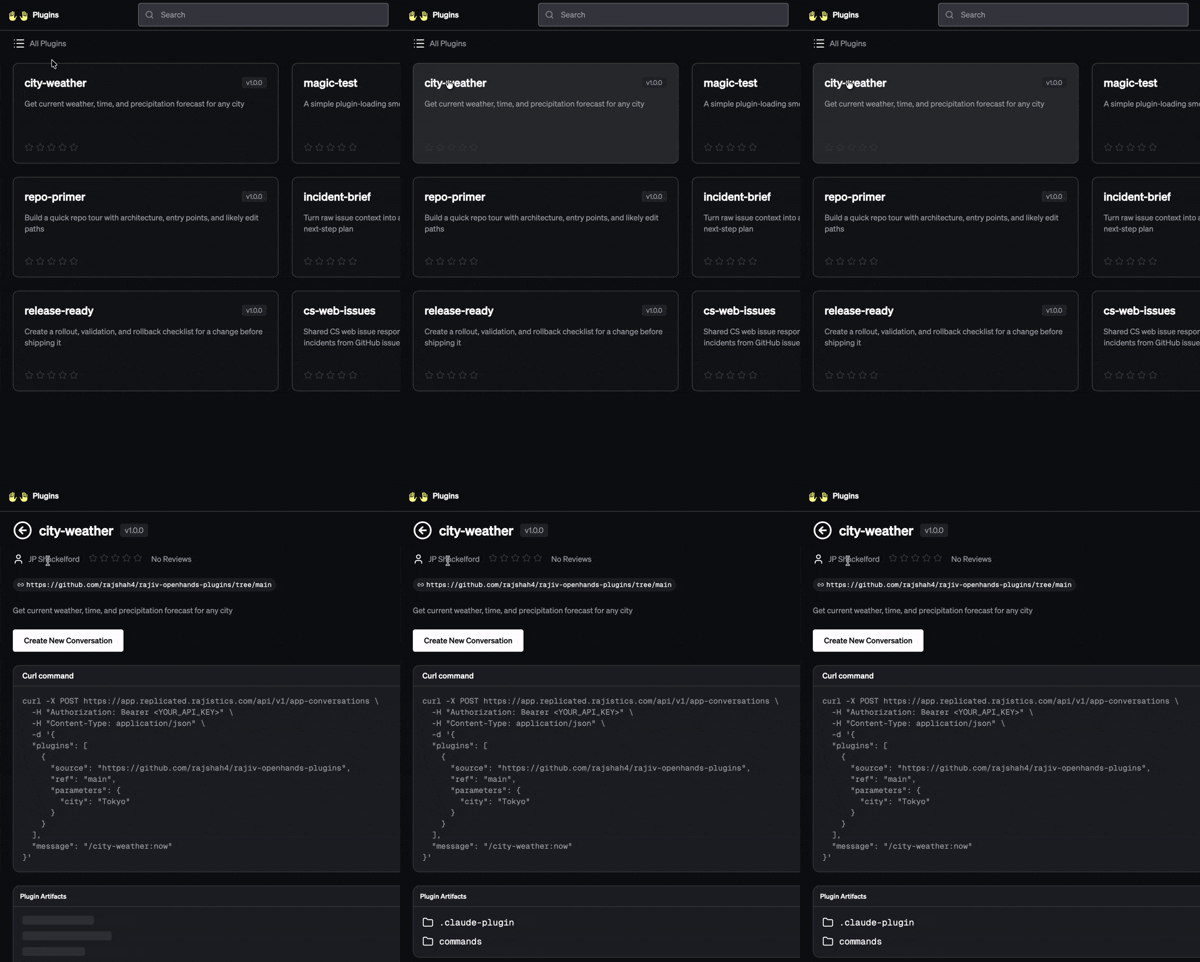
    The Plugin Marketplace is an opt-in feature that adds a browseable catalog of community-built
    OpenHands plugins to your Enterprise deployment. Once enabled, users can discover and review
    plugins directly at `/plugins` on your application hostname.

    <Note>
      The Plugin Marketplace is an experimental feature. Enable it only after your
      OpenHands Enterprise deployment is fully operational.
    </Note>
  </div>

  <div style={{flexShrink: 0}}>
    <img src="https://mintcdn.com/allhandsai-vertex-agent-server-docs/ITD3Qw5O8od3DiSp/enterprise/images/PluginMarketplaceClip.gif?s=d5a92e9d782e4e36e286ba9f7b26c1c2" alt="Plugin Marketplace demo" style={{maxWidth: '300px', borderRadius: '8px'}} width="400" height="481" data-path="enterprise/images/PluginMarketplaceClip.gif" />
  </div>
</div>

## Prerequisites

* A running OpenHands Enterprise deployment. See [Quick Start](/enterprise/quick-start) if
  you haven't already deployed.
* The bundled or [external PostgreSQL](/enterprise/external-postgres) database must be reachable.
  The marketplace creates a separate `plugindir` database to store plugin metadata.
* A Marketplace Source URI pointing to a plugin catalog (see [Marketplace Source URI](#marketplace-source-uri)).

## Enable the Plugin Marketplace
<Tabs>
  <Tab title="VM Install (Admin Console)">
    The Plugin Marketplace is configured through the Replicated Admin Console.

    ### 1. Open the Admin Console

    Navigate to `https://<your-base-domain>:30000` and log in.

    ### 2. Open the configuration page

    Click **Config** in the top navigation bar to open the application configuration page.

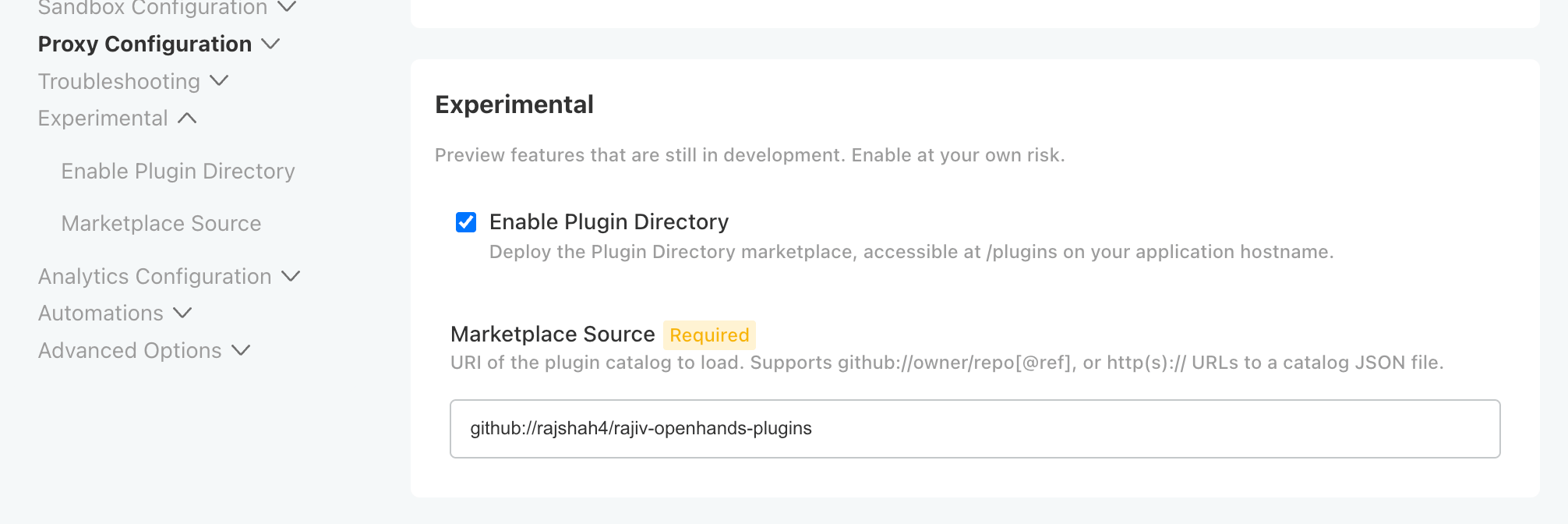
    ### 3. Enable the Plugin Directory

    Scroll to the **Experimental** section near the bottom of the configuration page.

    Check the **Enable Plugin Directory** box.

    <img src="https://mintcdn.com/allhandsai-vertex-agent-server-docs/ITD3Qw5O8od3DiSp/enterprise/images/Experimental-PluginMarketplace.png?fit=max&auto=format&n=ITD3Qw5O8od3DiSp&q=85&s=5e6465647103e83d645fe14f9b443988" alt="Enable Plugin Directory" width="2012" height="672" data-path="enterprise/images/Experimental-PluginMarketplace.png" />

    ### 4. Set the Marketplace Source

    Once **Enable Plugin Directory** is checked, a **Marketplace Source** field appears.

    Enter the URI of the plugin catalog you want to load. For example:

    ```text theme={null}
    github://AcmeCo/plugin-directory
    ```

    To pin to a specific release of the catalog, append a `@ref` tag:

    ```text theme={null}
    github://AcmeCo/plugin-directory@v1.0.0
    ```

    See [Marketplace Source URI](#marketplace-source-uri) for a full description of supported formats.

    ### 5. Save and deploy

    Scroll to the bottom of the configuration page and click **Save config**, then click **Deploy**
    to apply the changes.

    The deployment status will show **Unavailable** while the Plugin Directory pods start, then
    transition to **Ready** once all components are healthy.
  </Tab>

  <Tab title="Kubernetes (Helm)">
    If you deployed OpenHands Enterprise into your own Kubernetes cluster using Helm, enable the
    Plugin Marketplace by adding the following values to your `values.yaml` override file.

    ### Required values

    ```yaml theme={null}
    plugin-directory:
      enabled: true

      # Full URL where the plugin catalog is served
      appUrl: "https://app.<your-base-domain>/plugins"

      # Base URL used in in-page curl examples
      curlApiUrl: "https://app.<your-base-domain>"

      appEnv:
        # URI of the plugin catalog to load (required)
        MARKETPLACE_SOURCE: "github://AcmeCo/plugin-directory"

      database:
        host: "<postgres-host>"
        name: "plugindir"
        # Name of the Kubernetes Secret that contains the PostgreSQL password
        secretName: "postgres-password"
        secretKey: "password"

      auth:
        # Secret created by the openhands-secrets chart
        existingSecret: plugin-directory-secrets

      oidc:
        # Keycloak issuer URL — must match your Keycloak realm
        issuerUrl: "https://auth.app.<your-base-domain>"
        realmSecretName: "keycloak-realm"
    ```

    ### Required secrets

    The Plugin Directory needs two shared secrets for inter-service authentication and session
    management. Add these to your `openhands-secrets` chart values:

    ```yaml theme={null}
    plugin_directory_identity_shared_secret: "<random-32-character-string>"
    plugin_directory_session_secret: "<random-32-character-string>"
    ```

    Generate each value with:

    ```bash theme={null}
    openssl rand -hex 16
    ```

    ### Apply the changes

    ```bash theme={null}
    helm upgrade openhands oci://ghcr.io/openhands/helm-charts/openhands \
      --namespace openhands \
      --values values.yaml
    ```

    ### Database migration

    On first deployment, init containers automatically create the `plugindir` database and run
    Alembic migrations. No manual database setup is required.

    <Note>
      If you use an external PostgreSQL instance with `databaseMigrations.createDatabases: false`,
      create the `plugindir` database manually before deploying.
    </Note>
  </Tab>
</Tabs>

## Marketplace Source URI

The `MARKETPLACE_SOURCE` value (or **Marketplace Source** field in the Admin Console) tells the
Plugin Directory server where to load its plugin catalog from.

| Format                             | Example                                        | Notes                                            |
| ---------------------------------- | ---------------------------------------------- | ------------------------------------------------ |
| `github://owner/repo`              | `github://AcmeCo/plugin-directory`             | Loads from the default branch of the repository  |
| `github://owner/repo@ref`          | `github://AcmeCo/plugin-directory@v1.2.0`      | Loads from a specific branch, tag, or commit SHA |
| `https://example.com/catalog.json` | `https://cdn.example.com/plugins/catalog.json` | Loads a catalog JSON file over HTTPS             |

To host a private or curated catalog, point the URI to a GitHub repository or an HTTPS URL that
serves a compatible catalog JSON file.

## Accessing the Marketplace

Once the deployment is complete and shows **Ready**, the Plugin Marketplace is available at:

```text theme={null}
https://app.<your-base-domain>/plugins
```

Users authenticate through the same Keycloak SSO used for the rest of OpenHands Enterprise.
The Plugin Directory API is also available at:

```text theme={null}
https://app.<your-base-domain>/api/plugins
```

## Disabling the Plugin Marketplace

<Tabs>
  <Tab title="VM Install (Admin Console)">
    Open the Admin Console, navigate to **Config**, uncheck **Enable Plugin Directory** in the
    **Experimental** section, click **Save config**, then **Deploy**.
  </Tab>

  <Tab title="Kubernetes (Helm)">
    Set `plugin-directory.enabled: false` in your `values.yaml` and run `helm upgrade`.
  </Tab>
</Tabs>

## Next Steps

<CardGroup cols={2}>
  <Card title="Quick Start" icon="rocket" href="/enterprise/quick-start">
    Install or review the full OpenHands Enterprise deployment guide.
  </Card>

  <Card title="External PostgreSQL" icon="database" href="/enterprise/external-postgres">
    Configure an external PostgreSQL database for OpenHands Enterprise.
  </Card>

  <Card title="Kubernetes Installation" icon="dharmachakra" href="/enterprise/k8s-install/index">
    Deploy OpenHands Enterprise into your own Kubernetes cluster using Helm.
  </Card>

  <Card title="Enterprise Overview" icon="building" href="/enterprise/index">
    Learn about all OpenHands Enterprise features and deployment options.
  </Card>
</CardGroup>